Android圖形圖像Drawable的使用(二)
時間:2018-09-27 來源:未知
Android圖形圖像Drawable的使用(二)
時間:2018-09-27 來源:未知
在本文中,程序統一使用的原圖為image.jpg,如圖 1。

圖 1
(1) BitmapDrawable
首先是MainActivity的布局文件activity_main.xml。
本文引用地址://www.17old.cn/emb/Column/7551.html
<LinearLayout xmlns:android="//schemas.android.com/apk/res/android"
xmlns:tools="//schemas.android.com/tools"
android:layout_width="match_parent"
android:layout_height="match_parent"
android:orientation="horizontal"
tools:context="com.example.drawabletest.MainActivity" >
<TextView
android:id="@+id/text1"
android:layout_width="100dp"
android:layout_height="100dp"
android:layout_margin="2dp"
android:background="@drawable/bitmap_drawable_repeat" />
<TextView
android:id="@+id/text2"
android:layout_width="100dp"
android:layout_height="100dp"
android:layout_margin="2dp"
android:background="@drawable/bitmap_drawable_mirror" />
<TextView
android:id="@+id/text3"
android:layout_width="100dp"
android:layout_height="100dp"
android:layout_margin="2dp"
android:background="@drawable/bitmap_drawable_clamp" />
</LinearLayout>
上面三個TextView分別使用了不同的BitmapDrawable的tileMode,下面分別貼出這三個Drawable的xml文件。
bitmap_drawable_repeat.xml:
<?xml version="1.0" encoding="utf-8"?>
<bitmap xmlns:android="//schemas.android.com/apk/res/android"
android:src="@drawable/image"
android:tileMode="repeat" />
bitmap_drawable_mirror.xml:
<?xml version="1.0" encoding="utf-8"?>
<bitmap xmlns:android="//schemas.android.com/apk/res/android"
android:src="@drawable/image"
android:tileMode="mirror" />
bitmap_drawable_clamp.xml:
<?xml version="1.0" encoding="utf-8"?>
<bitmap xmlns:android="//schemas.android.com/apk/res/android"
android:src="@drawable/image"
android:tileMode="clamp" />
顯示效果如圖 2。
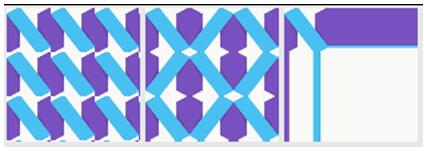
圖 2
(2) ShapeDrawable
首先是MainActivity的布局文件activity_main.xml。
<LinearLayout xmlns:android="//schemas.android.com/apk/res/android"
xmlns:tools="//schemas.android.com/tools"
android:layout_width="match_parent"
android:layout_height="match_parent"
android:orientation="horizontal"
tools:context="com.example.drawabletest.MainActivity" >
<TextView
android:id="@+id/text1"
android:layout_width="100dp"
android:layout_height="100dp"
android:layout_margin="2dp"
android:background="@drawable/shape_drawable_gradient_linear" />
<TextView
android:id="@+id/text2"
android:layout_width="100dp"
android:layout_height="100dp"
android:layout_margin="2dp"
android:background="@drawable/shape_drawable_gradient_radius" />
<TextView
android:id="@+id/text3"
android:layout_width="100dp"
android:layout_height="100dp"
android:layout_margin="2dp"
android:background="@drawable/shape_drawable_gradient_sweep" />
</LinearLayout>
上面三個TextView分別使用了不同的ShapeDrawable的type,下面分別貼出這三個Drawable的xml文件。
shape_drawable_gradient_linear.xml:
<?xml version="1.0" encoding="utf-8"?>
<shape xmlns:android="//schemas.android.com/apk/res/android"
android:shape="rectangle" >
<gradient
android:angle="45"
android:centerColor="#00ff00"
android:centerX="0.5"
android:centerY="0.5"
android:endColor="#0000ff"
android:startColor="#ff0000"
android:type="linear" />
</shape>
shape_drawable_gradient_radius.xml:
<?xml version="1.0" encoding="utf-8"?>
<shape xmlns:android="//schemas.android.com/apk/res/android"
android:shape="rectangle" >
<gradient
android:centerColor="#00ff00"
android:endColor="#0000ff"
android:gradientRadius="50"
android:startColor="#ff0000"
android:type="radial" />
</shape>
shape_drawable_gradient_sweep.xml:
<?xml version="1.0" encoding="utf-8"?>
<shape xmlns:android="//schemas.android.com/apk/res/android"
android:shape="rectangle" >
<gradient
android:centerColor="#00ff00"
android:endColor="#0000ff"
android:gradientRadius="50"
android:startColor="#ff0000"
android:type="radial" />
</shape>
顯示效果如圖 3。
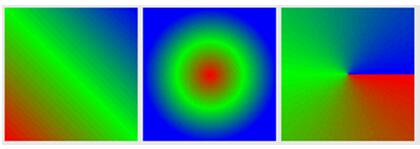
圖 3
(3) LayerDrawable
直接貼出layer_drawable.xml代碼,作為TextView的background。
<item>
<shape android:shape="rectangle" >
<solid android:color="#ff0000" />
</shape>
</item>
<item android:bottom="20dp">
<shape android:shape="rectangle" >
<solid android:color="#00ff00" />
</shape>
</item>
<item
android:bottom="10dp"
android:left="10dp"
android:right="10dp">
<?xml version="1.0" encoding="utf-8"?>
<layer-list xmlns:android="//schemas.android.com/apk/res/android" >
<shape android:shape="rectangle" >
<solid android:color="#0000ff" />
</shape>
</item>
</layer-list>
顯示效果如圖 4。
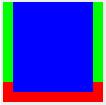
圖 4
(4) StateListDrawable
直接貼出statelist_drawable.xml代碼,作為TextView的background。
<?xml version="1.0" encoding="utf-8"?>
<selector xmlns:android="//schemas.android.com/apk/res/android" >
<item
android:drawable="@drawable/button_pressed"
android:state_pressed="true"/>
<!-- 按下TextView時顯示此狀態 -->
<item
android:drawable="@drawable/button_focused"
android:state_focused="true"/>
<!-- 沒有按下TextView且獲得焦點時顯示此狀態 -->
<item android:drawable="@drawable/button_normal"/>
<!-- TextView默認狀態 -->
</selector>
(5) LevelListDrawable
直接貼出levellist_drawable.xml代碼,作為TextView的background。
<?xml version="1.0" encoding="utf-8"?>
<level-list xmlns:android="//schemas.android.com/apk/res/android" >
<item
android:drawable="@drawable/low_level"
android:maxLevel="1000"
android:minLevel="0"/>
<!-- 當level為0~1000時,顯示此Drawable -->
<item
android:drawable="@drawable/high_level"
android:maxLevel="10000"
android:minLevel="1001"/>
<!-- 當level為1001~10000時,顯示此Drawable -->
</level-list>
(6) InsetDrawable
直接貼出inset_drawable.xml代碼,作為TextView的background。
<?xml version="1.0" encoding="utf-8"?>
<inset xmlns:android="//schemas.android.com/apk/res/android"
android:insetBottom="15dp"
android:insetLeft="15dp"
android:insetRight="15dp"
android:insetTop="15dp" >
<shape android:shape="rectangle" >
<solid android:color="#00ff00" />
</shape>
</inset>
(7) ClipDrawable
直接貼出clip_drawable.xml代碼,作為ImageView的background。
<?xml version="1.0" encoding="utf-8"?>
<clip xmlns:android="//schemas.android.com/apk/res/android"android:clipOrientation="vertical"
android:drawable="@drawable/image"
android:gravity="bottom" />
ImageView的布局為:
<ImageView
android:id="@+id/img1"
android:layout_width="100dp"
android:layout_height="100dp"
android:gravity="center"
android:src="@drawable/clip_drawable" />
MainActivity.java代碼中:
ImageView mImageView = (ImageView) findViewById(R.id.img1);
ClipDrawable clipDrawable = (ClipDrawable)mImageView.getDrawable();
clipDrawable.setLevel(5000);