LinearLayout的權重屬性
時間:2018-09-25 來源:未知
LinearLayout的權重屬性
時間:2018-09-25 來源:未知
LinearLayout子控件重要的屬性 android:layout_weight, 值為整數, 默認為0
1 當父控件LinearLayout中android:orientation="vertical"時
子控件高度 = 子控件原本高度 + (父控件LinearLayout高度 - 所有子控件高度之和) * 子控件高度權重比
2 當父控件LinearLayout中android:orientation="horizontal",
子控件寬度 = 子控件原本寬度 + (父控件LinearLayout寬度 - 所有子控件寬度之和) * 子控件寬度權重比
(match_parent或fill_parent都指父控件高度或寬度)
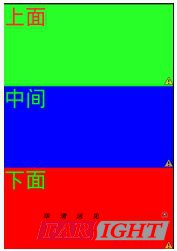
例1:
<LinearLayout xmlns:android="//schemas.android.com/apk/res/android"
android:layout_width="match_parent"
android:layout_height="match_parent"
android:orientation="vertical"
>
<TextView
android:layout_width="match_parent"
android:layout_height="match_parent"
android:textColor="#f00"
android:background="#0f0"
android:text="上面"
android:textSize="40sp"
android:layout_weight="1"
/>
<TextView
android:layout_width="match_parent"
android:layout_height="match_parent"
android:textColor="#0f0"
android:background="#00f"
android:text="中間"
android:textSize="40sp"
android:layout_weight="1"
/>
<TextView
android:layout_width="match_parent"
android:layout_height="match_parent"
android:textColor="#0f0"
android:background="#f00"
android:text="下面"
android:textSize="40sp"
android:layout_weight="1"
/>
</LinearLayout>
---->子控件高度 = 子控件原本高度 + (父控件LinearLayout高度 - 所有子控件高度之和) * 子控件高度權重比
上面第個子控件TextView的高度
= 1屏高 + [ (1屏高 - 3屏高) * 1/(1+1+1) ]
= 1屏高 + [-2屏高*(1/3) ]
= 1屏高 - 2屏高*(1/3)
= 1屏高 - 2/3屏高
= 1/3 屏高
例2:
<?xml version="1.0" encoding="utf-8"?>
<LinearLayout xmlns:android="//schemas.android.com/apk/res/android"
android:orientation="vertical"
android:layout_width="fill_parent"
android:layout_height="fill_parent"
>
<EditText
android:layout_width="fill_parent"
android:layout_height="wrap_content"
android:gravity="left"
android:text="one"/>
<EditText
android:layout_width="fill_parent"
android:layout_height="wrap_content"
android:gravity="center"
android:layout_weight="1.0"
android:text="two"/>
<EditText
android:layout_width="fill_parent"
android:layout_height="wrap_content"
android:gravity="right"
android:text="three"/>
</LinearLayout>
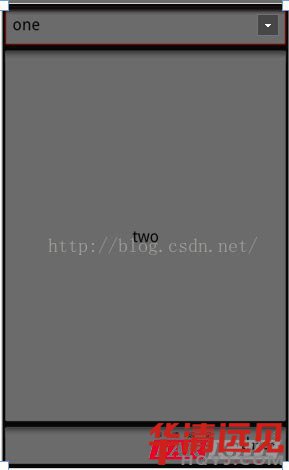
分析
**使用公式---->子控件高度 = 子控件原本高度 + (父控件LinearLayout高度 - 所有子控件高度之和) * 子控件高度權重比
**(1) one的高度 = one高度 + [1屏高 - (one高度+two高度+three高度) ] * 0/(1+0+0)
= one高度 + 0
= one高度
(2)two的高度 = two高度 +[1屏高 - (one高度+two高度+three高度) ] * 1/(1+0+0)
= one高度 +[1屏高 - (one高度+one高度+one高度) ]
= one高度 +[1屏高 - 3one高度]
= 1屏高 - 2one高度
(3)three的高度 = one高度 + [1屏高 - (one高度+two高度+three高度) ] * 0/(1+0+0)
= one高度 + 0
' = one高度 = three高度
例3:
<?xml version="1.0" encoding="UTF-8"?>
<LinearLayout xmlns:android="//schemas.android.com/apk/res/android"
android:layout_width="fill_parent"
android:layout_height="wrap_content"
android:orientation="horizontal" >
<TextView
android:background="#ff0000"
android:layout_width="**"
android:layout_height="wrap_content"
android:text="1"
android:textColor="@android:color/white"
android:layout_weight="1"/>
<TextView
android:background="#cccccc"
android:layout_width="**"
android:layout_height="wrap_content"
android:text="2"
android:textColor="@android:color/black"
android:layout_weight="2" />
<TextView
android:background="#ddaacc"
android:layout_width="**"
android:layout_height="wrap_content"
android:text="3"
android:textColor="@android:color/black"
android:layout_weight="3" />
</LinearLayout>
分析:
**使用公式子控件寬度 = 子控件原本寬度 + (父控件LinearLayout寬度 - 所有子控件寬度之和) * 子控件寬度權重比
** 當三個android:layout_width="**"都改為android:layout_width="wrap_content"時, 三個TextView的原本寬度一樣寬,該寬度下面使用X表示

第1個TextView寬度 = X + (1屏寬 - 3X) * 1/(1+2+3)
= X + (1屏寬 - 3X) * 1/6
=X- (1/2)X + (1/6)屏寬
= (1/2)X + (1/6)屏寬
第2個TextView寬度 = X+ (1屏寬 - 3X) * 2/(1+2+3)
= X+ (1屏寬 - 3X) * 1/3
= X- X+ (1/3)屏寬
= (1/3)屏寬
第3個TextView寬度 = X+ (1屏寬 - 3X) * 3/(1+2+3)
= X + (1屏寬 - 3X) * 1/2
= X- (3/2)X + (1/2)屏寬
= (1/2)屏寬 - (1/2)X
當三個android:layout_width="**"都改為android:layout_width="fill_parent"時, 并把原android:layout_weight改為 1, 2, 2
三個TextView的原本寬度一樣寬,該寬度都是一個屏寬, 使用W表示
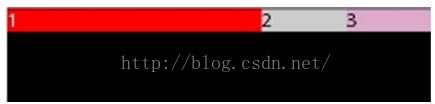
第1個TextView寬度 = W + (W - 3W) * 1/(1+2+2)
= W + (W - 3W) * 1/5
= W - 2W * (1/5)
= W-(2/5)W
= (3/5)W
第2個TextView寬度 = W + (W - 3W) * 2/(1+2+2)
= W + (W - 3W) * 2/5
= W - 2W * (2/5)
= W-(4/5)W
= (1/5)W
第3個TextView寬度 = W + (W - 3W) * 2/(1+2+2)
= W + (W - 3W) * 2/5
= W - 2W * (2/5)
= W-(4/5)W
= (1/5)W
當三個android:layout_width="**"都改為android:layout_width="fill_parent"時, 并把原android:layout_weight改為 1, 2, 3
三個TextView的原本寬度一樣寬,該寬度都是一個屏寬, 使用1W表示
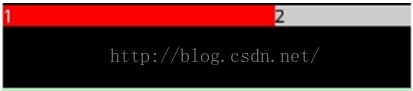
第1個TextView寬度 = W + (W - 3W) * 1/(1+2+3)
=W + (W - 3W) * 1/6
=W - 2W * (1/6)
=W-(1/3)W
= (2/3)W
第2個TextView寬度 = W + (W - 3W) * 2/(1+2+3)
= W + (W - 3W) * 2/6
= W - 2W * (1/3)
= W-(2/3)W
= (1/3)W
第3個TextView寬度 = W + (W - 3W) * 3/(1+2+3)
= W + (W - 3W) * 1/2
= W - 2W * (1/2)
= W- W
=0